Common MDM Kiosk Management challenges
Problem | How NinjaOne resolves it |
Organizations need dedicated Android devices to perform a specific task without giving users access to unrelated apps or device functions. | NinjaOne lets IT teams configure single-app or multi-app kiosk mode, restricting devices to the applications needed for their intended purpose. |
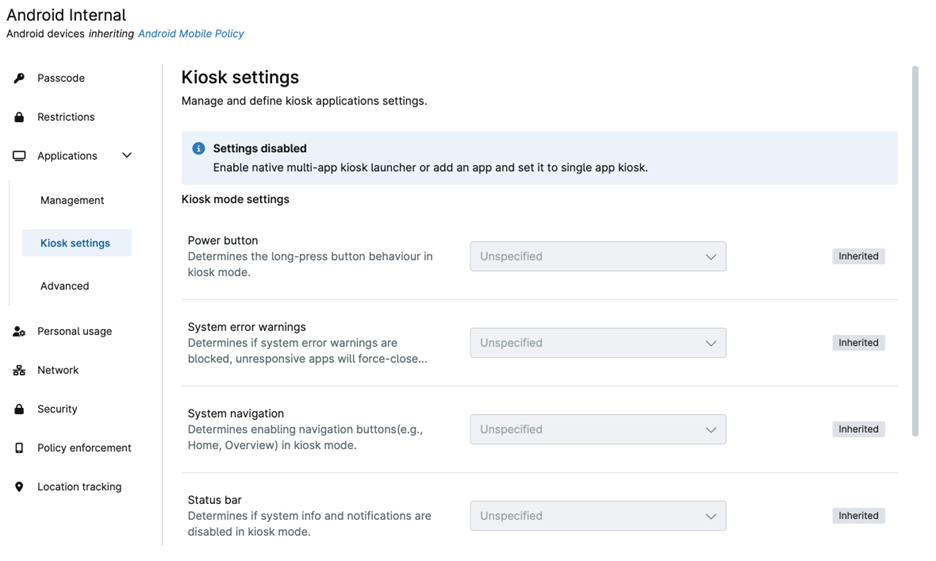
Shared or public-facing devices can be exposed to unauthorized apps, settings, or system functions when users have unrestricted access. | NinjaOne allows administrators to control kiosk behavior through settings for system navigation, the status bar, device settings, system error warnings, and the power button, helping keep devices within their intended operating environment. |
IT teams managing multiple kiosk devices need a consistent configuration without setting up each device individually. | NinjaOne manages kiosk configurations through MDM policies, allowing technicians to define kiosk applications and settings in a centralized policy and apply them to the relevant Android devices. |
Kiosk devices used for different business functions may require different application sets and user experiences. | NinjaOne supports single-app and multi-app kiosk configurations, allowing administrators to tailor the applications and kiosk behavior to the device’s intended use. |
How MDM kiosk management improves device control and operational efficiency
Unauthorized device use is reduced by restricting company-owned Android devices to approved applications and functions, helping prevent access to unrelated apps and settings.
Dedicated devices remain focused on their intended purpose by providing controlled single-app or multi-app environments for use cases such as point-of-sale, self-service, ticketing, and catalog devices.
User experiences become more consistent by controlling which applications and functions are available on kiosk devices, reducing unnecessary options and keeping devices aligned with their assigned workflows.
Device management requires less physical intervention because administrators can manage kiosk configurations through NinjaOne MDM policies, helping IT teams maintain dedicated-use devices without needing to configure each device manually.
Kiosk fleets are easier to maintain at scale by applying policy-based configurations across managed devices while keeping device management centralized alongside the broader mobile fleet.
NinjaOne offers innovative features for effortless MDM device tracking and management

Single-app kiosk mode
NinjaOne can lock Android devices to a designated application, restricting the device to its intended purpose and preventing users from accessing other applications or device functions. Administrators configure the dedicated application through an Android policy and assign it as a Single-App Kiosk.

Multi-app kiosk mode
NinjaOne lets administrators configure Android devices to run a controlled set of approved applications through Multi-App Kiosk mode. IT teams can enable the native kiosk launcher, select the required applications, and configure the kiosk experience through an Android policy.

Kiosk device restrictions
NinjaOne provides configurable controls for restricting device functions while in kiosk mode, including system navigation, the power button, the status bar, system error warnings, and access to device settings. These controls help keep dedicated-use devices within their intended operating environment.

Policy-based kiosk configuration
NinjaOne manages kiosk settings through Android policies, allowing administrators to define kiosk configurations and apply them to company-owned Android devices. This provides a consistent way to configure dedicated-use devices without individually configuring each device.

Managed application control
NinjaOne lets administrators define which applications are available on kiosk devices by adding managed applications to an Android policy. Required applications can be configured for Multi-App Kiosk mode, while a dedicated application can be assigned for Single-App Kiosk mode.
How organizations use MDM Kiosk Management
Managing dedicated point-of-sale and transaction devices
Retailers and restaurants use NinjaOne MDM kiosk mode to configure Android tablets as dedicated point-of-sale devices. IT teams can restrict the device to the approved POS application in Single-App mode, preventing users from accessing other applications or device settings. For environments that require multiple business applications, Multi-App mode can provide access to a defined set of approved apps while keeping the device within its intended workflow.
Deploying controlled self-service and information kiosks
Organizations use NinjaOne MDM kiosk mode to turn Android devices into self-service terminals, information stations, or digital displays. Administrators can assign the required application or applications through an MDM policy and restrict navigation, device settings, and other system functions that could allow users to leave the intended kiosk experience. This helps maintain a consistent interface across devices deployed in public or shared locations.
Standardizing shared devices across multiple locations
MSPs managing Android kiosks across multiple customer environments, locations, or facilities can apply a common kiosk policy to groups of company-owned devices. The policy can define the approved applications and kiosk controls, reducing the need to configure each device individually. When requirements change, administrators can update the policy and apply the revised configuration to the managed devices.


Ready to simplify work with unified IT?
How MDM kiosk management works in NinjaOne MDM
I. Enroll devices for kiosk use
NinjaOne Mobile Device Management (MDM) supports BYOD, COPE, and company-owned usage types, and kiosk enrollment applies to company-owned devices. Enrolling a device as company-owned gives IT teams the dedicated device lifecycle needed to lock it into a single-purpose role, such as a point-of-sale terminal, digital sign, or information kiosk. Kiosk enrollment through MDM is currently available for Android devices, with Apple kiosk support in development.
II. Choose single-app or multi-app kiosk mode
MDM includes a kiosk launcher that restricts a device to one app in single-app mode or to a defined set of apps and websites in multi-app mode. Single-app mode suits a dedicated task like a ticketing display or a check-in screen, and multi-app mode supports a shared device that needs to run a point-of-sale app alongside a scanner or payment utility.
III. Configure kiosk settings and restrictions
Administrators configure kiosk basic settings in MDM to control user access, application behavior, and device lockdown for each kiosk device, and these settings can be applied through policy so every device in a fleet stays consistent. App assignment types (unspecified, preinstalled, or force installed) determine which apps are available on the device and whether end users can remove them.
IV. Manage and monitor kiosk devices at scale
Once kiosk devices are enrolled and configured, MDM gives IT teams a single console to monitor device status, enforce policy across the fleet, and take remote actions such as locking a device or resetting a passcode when needed. Centralized visibility helps teams catch issues at individual kiosks before they affect the people relying on them. NinjaOne applies the same policy-based management to kiosk devices that it uses across company-owned devices generally.
Why organizations trust NinjaOne
MDM kiosk management that keeps devices running
IT teams use NinjaOne to gain centralized visibility into large fleets of kiosk devices, monitoring device health and catching problems before they disrupt the people relying on those devices.
"NinjaOne allows us to ensure the system is up and running 24/7/365,"
— Rory McCune, IT Director, Flash
Source: NinjaOne
Manage kiosk devices with NinjaOne MDM
Keep shared and purpose-built devices focused on the apps and functions users need. With NinjaOne MDM, IT teams can configure kiosk mode, control device features and applications, and manage kiosk-enabled devices from a centralized platform. Explore how NinjaOne can simplify kiosk configuration and ongoing device management.
Resources
FAQs
What is NinjaOne MDM kiosk management for Android devices?
NinjaOne MDM kiosk management locks company-owned Android devices to approved apps and websites for a specific, dedicated purpose. IT teams can configure single-app or multi-app kiosk mode through an Android policy and apply device restrictions to help keep devices within their intended workflow.
What’s the difference between single-app and multi-app kiosk mode?
Single-app kiosk mode locks an Android device to one designated application, making it suitable for dedicated use cases such as point-of-sale or digital signage. Multi-app kiosk mode allows access to a defined set of approved apps and websites, supporting workflows that require multiple applications, such as a POS app alongside a scanner utility.
Is NinjaOne MDM kiosk mode available for Apple devices?
NinjaOne MDM kiosk mode is currently available for Android devices. Apple kiosk support is in development.
What device restrictions can NinjaOne MDM apply in kiosk mode?
NinjaOne MDM can restrict system navigation, the status bar, the power button, system error warnings, and access to device settings. These restrictions help keep kiosk devices focused on their intended purpose and prevent users from accessing unrelated device functions.
What are the benefits of NinjaOne MDM kiosk mode for Android?
NinjaOne MDM kiosk mode helps reduce unauthorized device use, keeps dedicated devices focused on their intended purpose, and gives IT teams centralized control over kiosk configurations through policies. This reduces the need to configure and maintain each kiosk device individually.